
The best AI tools for turning one idea into several social posts
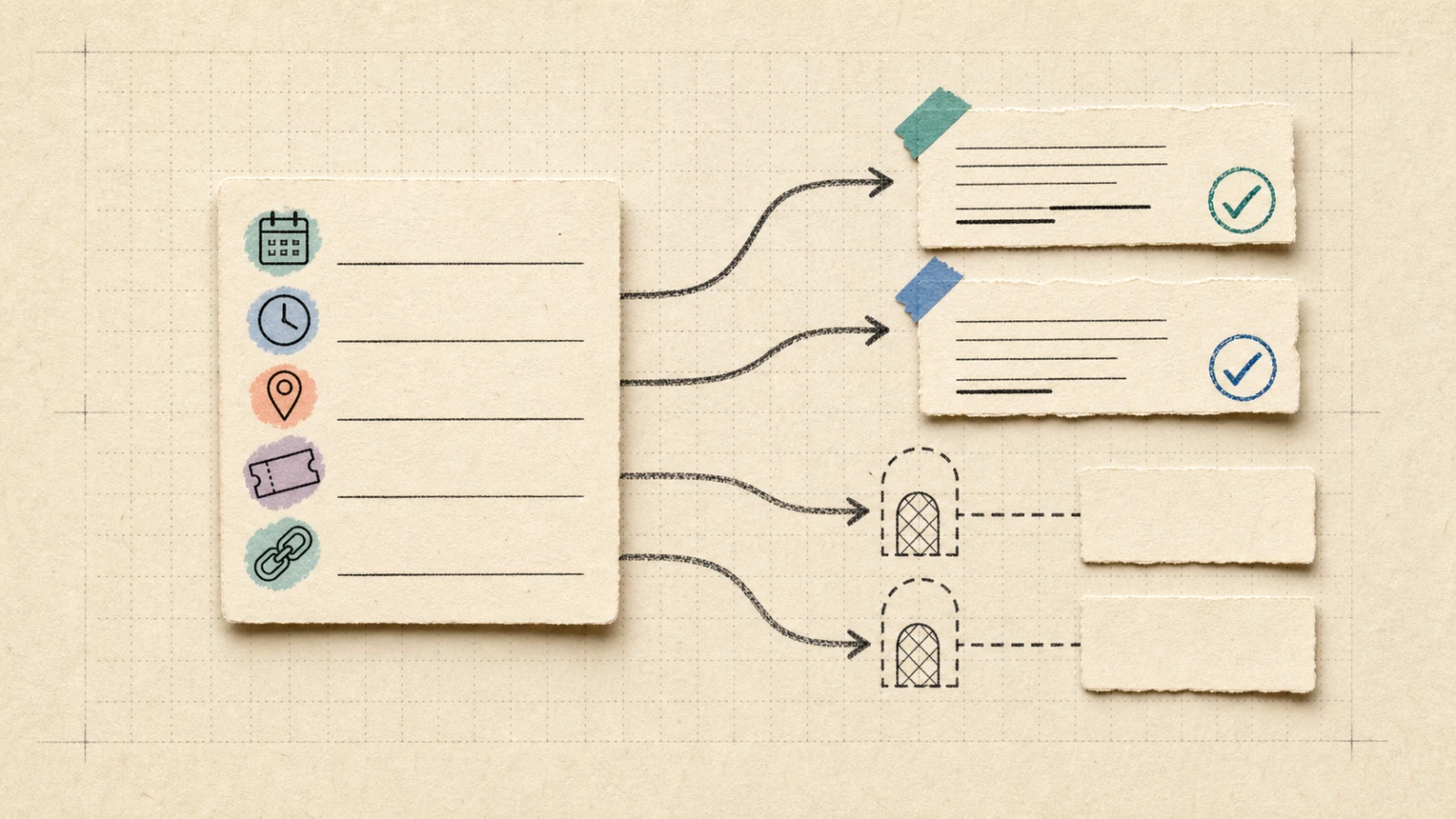
A shop owner, club organizer, freelancer, or small business worker may have one announcement to share in three places: an Instagram caption, a LinkedIn update, and a shorter post. The annoying part is not finding new words. It is keeping the date, time, address, price, and sign-up link intact while the wording changes.
For this exact job, Buffer produced the safer readable first draft in a same-announcement check. Predis created more social-first variants, but its visible drafts dropped the exact time and street address. Canva and Adobe Express stayed in the four-tool field, yet neither observed route produced a readable result safely enough to rank. The practical result is a bounded choice between two readable paths, plus a clear reason not to pretend the comparison is complete.
The quick answer
Choose Buffer first when the goal is a platform-shaped starting draft with the least visible fact repair. Its public generator returned general, X/Twitter, and LinkedIn versions that kept the date, time, price, and sign-up URL. The address changed from 18 Market Street to 18 Market St., so a source check still matters.
Choose Predis when several social-first angles are useful and restoring missing details is acceptable. Its public LinkedIn generator returned three readable variants, but the visible text kept the price and link while dropping the exact time and street address.
Canva and Adobe Express are not ranked here. Canva/OpenRep returned a success notice without readable caption text. Adobe Express Caption Writer requested account-completion details before a caption could be reviewed. Those are access and inspectability boundaries, not product verdicts.
Here, a call to action simply means the next thing a reader should do, such as signing up. Before sharing any generated version, compare the draft with the original announcement.
The same announcement went through all four paths
Feature lists describe possibilities. The useful test starts with the small block of facts that a real person needs before acting:
Riverside Makers Club: Make a Product Video in One Afternoon, Saturday, Sep 12, 2026, 10 a.m., 18 Market Street. Tickets $25. Sign up: https://example.com/riverside-video.
Five details had to survive:
- Date: Saturday, Sep 12, 2026
- Time: 10 a.m.
- Place: 18 Market Street
- Price: $25
- Sign-up link: https://example.com/riverside-video
The same 171-character fixture went through the four locked candidates wherever the safe free route accepted it. The comparison checked the five details, platform adaptation, visible edit burden, and whether the result could be inspected without accepting a paid trial or entering sensitive account information.
| Candidate | Visible result in the observed route | What the result means for this choice |
|---|---|---|
| Buffer AI Assistant | General, X/Twitter, and LinkedIn drafts were readable; date, time, price, and link stayed visible; the address was shortened. | Rankable readable path; least repair in this fixture, with a final source check. |
| Predis | Three LinkedIn drafts were readable; price and link stayed visible; exact time and address disappeared. | Rankable readable path; useful social-first alternative with a larger repair step. |
| Canva/OpenRep | Captions generated successfully appeared, but no caption text was readable in the panel or canvas. | Not rankable in this run; result inspectability was incomplete. |
| Adobe Express | Caption Writer redirected to account completion and requested birth date and country/region before output. | Not rankable in this run; the safe access boundary arrived first. |
Only the first two rows support an output-retention comparison. Keeping all four rows visible matters because inclusion and ranking are different decisions: a product can belong in the conversation without producing a result that can be compared fairly in the observed route.
Buffer kept more of the details
Buffer's public generator returned three readable versions from the announcement. The general version kept the date, time, price, and link while shortening the address:
Make a product video in one afternoon! Riverside Makers Club - Sat, Sep 12, 2026 - 10:00 AM - 18 Market St. Tickets $25. Sign up: https://example.com/riverside-video
The X/Twitter version changed the framing and added a hashtag:
Want a snappier caption for X/Twitter: Make a product video in one afternoon - Riverside Makers Club, Sep 12, 2026 @ 10 AM, 18 Market St. $25. Sign up: https://example.com/riverside-video #VideoWorkshop
The LinkedIn version kept the same practical details but changed the wording to Learn how to create a polished product video and changed Sign up to Register:
For LinkedIn: Riverside Makers Club: Learn how to create a polished product video in a single afternoon. Saturday, Sep 12, 2026 - 10:00 AM - 18 Market St. Tickets $25. Register: https://example.com/riverside-video
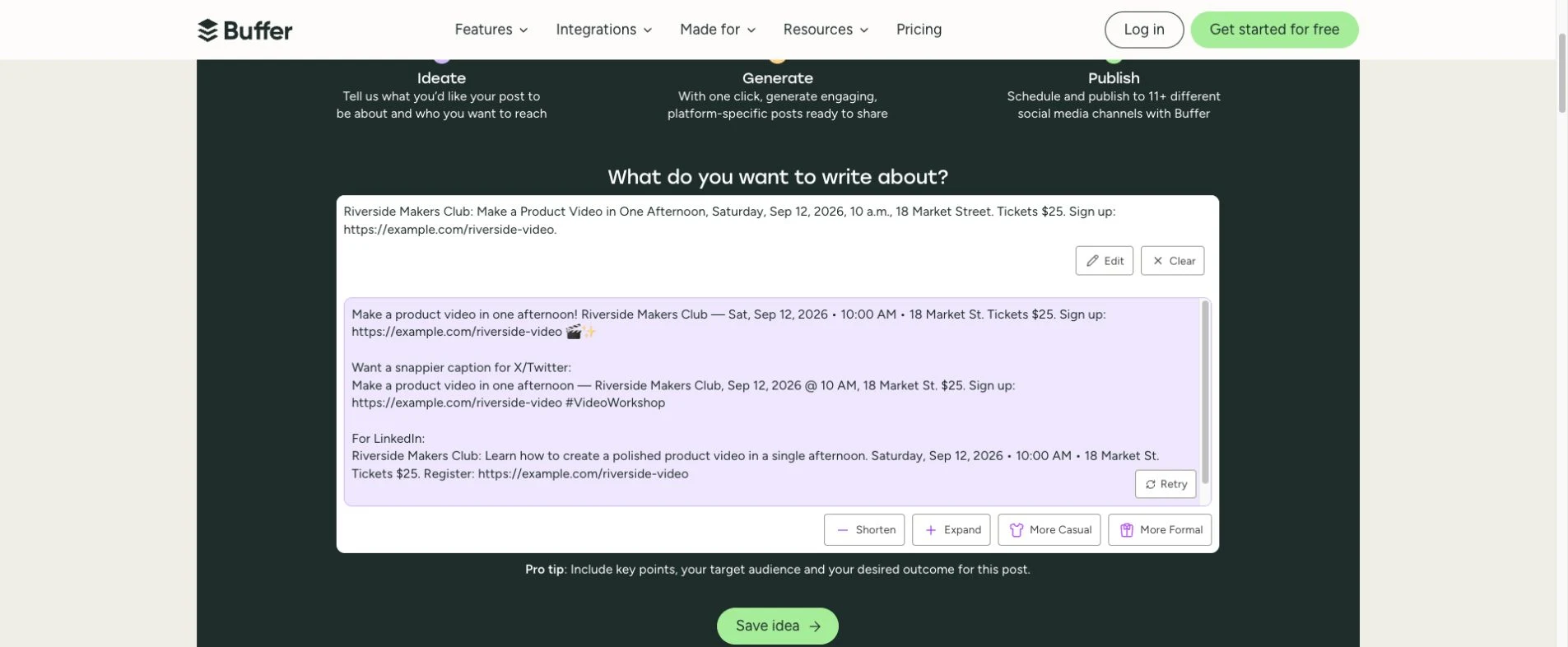
Buffer kept the date, time, price, and link visible across the three readable versions. The address still needs to be checked against the source.
The useful distinction is not that the drafts are perfect. It is that the visible starting copy kept four of the five practical checks intact and made the remaining change easy to spot. The added polished, emoji, and hashtag are ordinary style edits; the shortened address is the detail that deserves a direct source check.
The official support guidance adds an important limit: facts should be supplied in the prompt because the AI may be inaccurate and does not read URLs. That matches the test condition. The full event details were written into the prompt rather than hidden behind the example link.
The public generator allows up to five recommendations per day. The official Free plan is described as Free forever, with up to three channels and ten scheduled posts per channel. Those plan facts describe access, not a guarantee that every generated post will keep every fact. Automatic publishing was not tested.
For this announcement and this public route, Buffer is the safer readable first pass. The sentence is intentionally narrow: it describes the amount of repair visible in one controlled input, not a universal product ranking.
Predis made more variants but dropped key details
Predis accepted the same English announcement in its no-login LinkedIn Post Generator with Professional tone, hashtags on, and emojis off. Three variants appeared. The first began with an inviting rewrite about an immersive experience in product videography; the second reframed the event as a chance to enhance skills; the third positioned it as a way to elevate a brand.
The visible variants kept the $25 price and the sign-up URL. They did not keep the exact 10 a.m. time or 18 Market Street address. The date also shifted between September 12, 2026 and September 12th, and the generator added hashtags such as #ProductVideo and #VideoProduction.
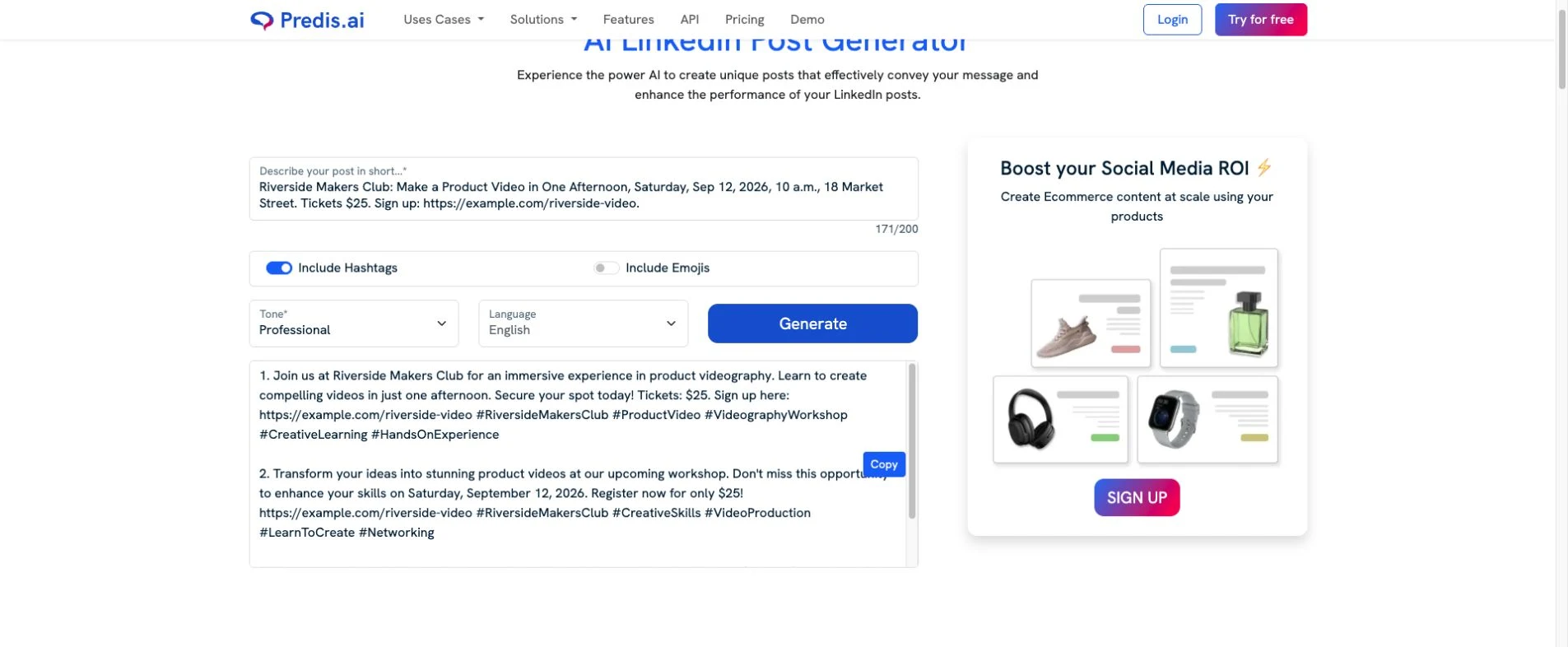
Predis produced readable starting variants, but the missing time and street address turn the source announcement into a repair list.
That is a real use case for Predis, just a narrower one than “paste and publish.” A freelancer looking for several tones or a social-first angle may find the variants useful. A club organizer sharing a precise event should keep the original announcement open, restore the time and address, and check every extra promise before sharing.
The public route tested here is LinkedIn-specific. Predis's official product pages describe a wider social-generation and scheduling scope, while the current pricing page lists paid Core, Rise, and Enterprise plans. Those pages provide product and access context; they do not turn the no-login LinkedIn result into proof of a full multi-platform free workflow.
Predis therefore earns a place as the social-first alternative in this comparison. The visible behavior is specific: more variants, more added framing, and a larger fact-restoration step for this announcement.
Why Canva and Adobe Express stay unresolved
Canva/OpenRep accepted the same announcement after the feature page led into a Canva editor. Instagram, X, and LinkedIn were selected, and the app returned Captions generated successfully. No readable caption appeared in the OpenRep panel or on the design canvas. The editor also showed trial prompts that would convert to monthly paid plans. No trial was accepted.
That leaves a visibility problem, not a quality verdict. Without the wording, the result cannot be checked for date retention, platform fit, or manual repair beside Buffer and Predis. Canva's official feature, writing, planning, and pricing pages remain relevant product context, but they cannot supply a missing same-fixture output.
Adobe Express reached a different boundary. Caption Writer opened from the social route, then redirected to Complete your account and requested a birth date and country/region before a caption could be reviewed. No sensitive details were entered. No generated caption is claimed.
Adobe Express stays in the locked field because its official documentation describes caption drafting, rewriting, resizing, and scheduling surfaces. Those facts explain what a reader may investigate next; they do not establish how this exact announcement would survive the route.
An unrendered result is an access boundary, not a product verdict. Ranking requires an output that can be inspected without accepting a trial or adding a sensitive account step. Canva and Adobe Express are therefore included as unresolved states, not labeled as failed, worst, paid-only, or inferior.
The decision before sharing
For this announcement, start with Buffer if the goal is the least repair before a quick source check. Keep Predis as the social-first alternative when several starting angles are worth a larger cleanup. Keep Canva and Adobe Express unresolved rather than pretending the field is complete.
Before any version is shared, compare it with the original announcement:
- Date
- Time
- Place
- Price
- Sign-up link
Buffer's readable outputs retained the date, time, price, and URL, but shortened the address. Predis's readable variants retained the price and URL but dropped the exact time and address. Both paths therefore need the original announcement beside the draft during the final check.
If any item fails the checklist, restore it manually from the source or write the post directly from the source. The useful behavior change is the pause before sharing: generated copy is a draft to check and repair, not the announcement itself.
Discussion
0 replies