
Canva and Adobe Express occupy the same deceptively simple category: visual tools for people who need to make something presentable without opening a specialist design application. Both can start from a template or an empty page. Both combine text, images, shapes, stock media, sharing, and export. Both are approachable enough that the first few minutes can feel almost interchangeable.
The useful difference appears when a vague request has to become a finished asset.
For the same fictional software launch, Canva was better at supplying a coherent visual system before the editing began. Adobe Express made a blank composition easy to understand, but its search results did less to narrow the brief. Once the design needed another size, both products put the layout-aware shortcut behind a paid plan. At handoff, Canva exposed more destinations from the project; Adobe Express kept the common static formats compact.
That produces a more practical verdict than a feature-count comparison. Canva is the safer choice when the starting point and downstream formats are still uncertain. Adobe Express is the cleaner fit when the visual direction is already settled and the job is a straightforward static composition.
One brief, four moments that change the choice
The comparison used one fictional product, Relay, and one request: create a 1600 × 900 launch visual for a software update that replaces status meetings with weekly project signals. The same language—dark modern software product launch—was used to inspect the starting points in both products. The resulting asset needed a brand name, a clear headline, a supporting line, a visual accent, and an action label.
The test was not designed to crown the prettier picture. A mature Canva template and an Adobe blank page are not equal measures of raw editing power. They are, however, the two routes these products actively place in front of a non-designer. The comparison therefore follows four decision moments rather than pretending that every feature was exhaustively benchmarked.
| Decision moment | What the evidence can answer | What it cannot answer |
|---|---|---|
| Search | How well the same query narrows the starting point | The total quality of either template library |
| First composition | How much visual structure arrives before manual layout | Which editor offers deeper professional control |
| Resize | Whether an approved design can become another channel size on the free path | How well paid automatic reflow handles every layout |
| Handoff | Which destinations appear for this project | Generated-file quality or every route across every project type |
Canva treated the query as a design problem
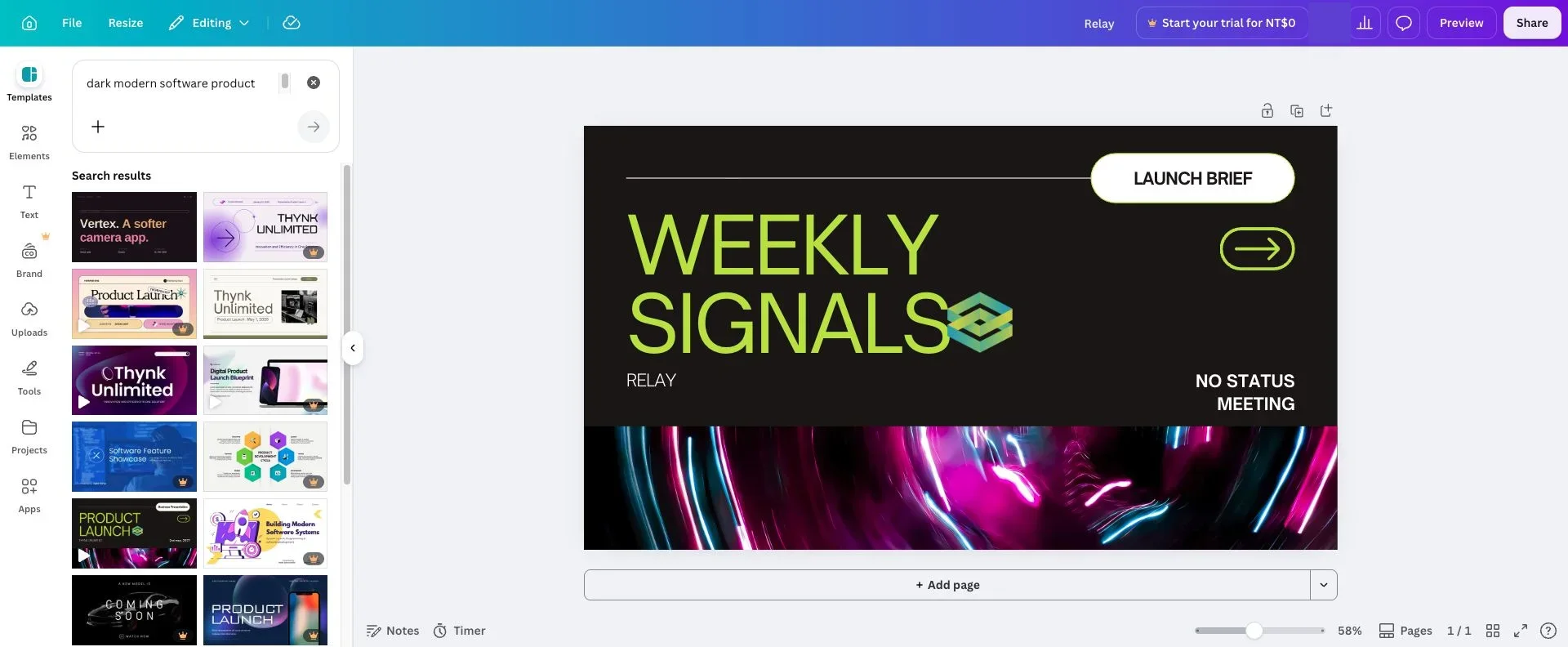
The Canva search took place inside the editor, beside the existing page. The same phrase returned presentation-oriented launch systems: multi-page pitch decks, software showcases, dark product-launch layouts, and several closely related visual directions. Not every result matched the brief, but enough of the first visible set shared the right format and intent that the search reduced the design problem.
Adobe Express returned a much larger universe—millions of results across templates, photos, videos, backgrounds, design assets, and stickers. The number sounds impressive until the first template row is examined. It mixed a vertical “coming soon” story, a software proposal, a conference announcement, a timeline, a release graphic, social ads, and premium items. The query found launch-adjacent material, but it did not decide which kind of launch asset was being made.
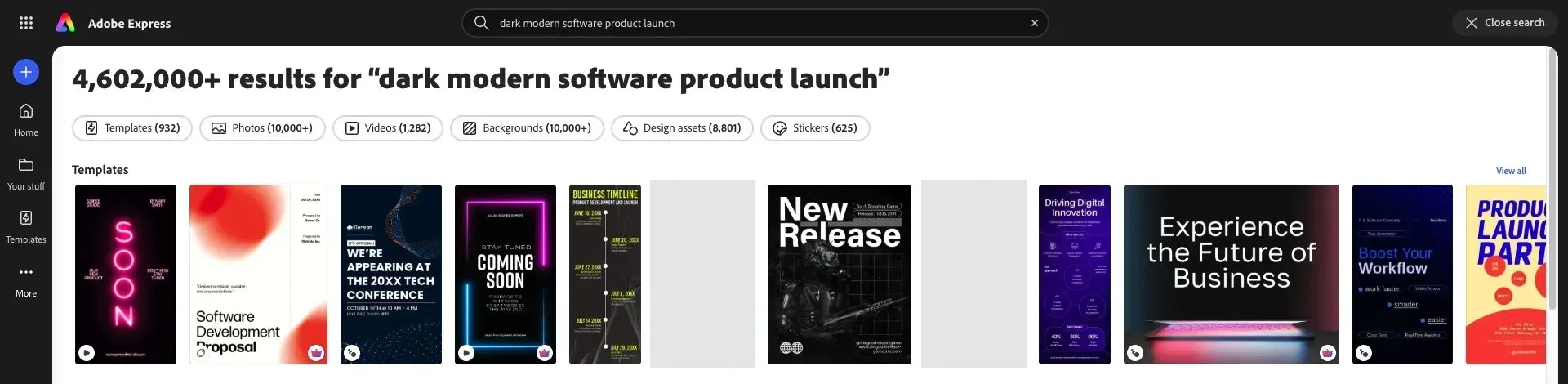
The separation was not library size but how much format judgment remained after the search. Canva narrowed a vague request toward a repeatable presentation system; Adobe Express returned more kinds of ingredients and left the asset decision open. A more precise Adobe query or a known template could reverse the speed advantage, so this finding applies to broad briefs rather than every search.
The first draft exposed two different kinds of speed
The Canva route began with a relevant visual system and then replaced what mattered. The Relay page retained a dark background, a strong two-part hierarchy, an accent color, an image band, and a compact action area. The work was mostly adaptation: changing language, keeping useful spacing, and deciding which source elements still belonged.
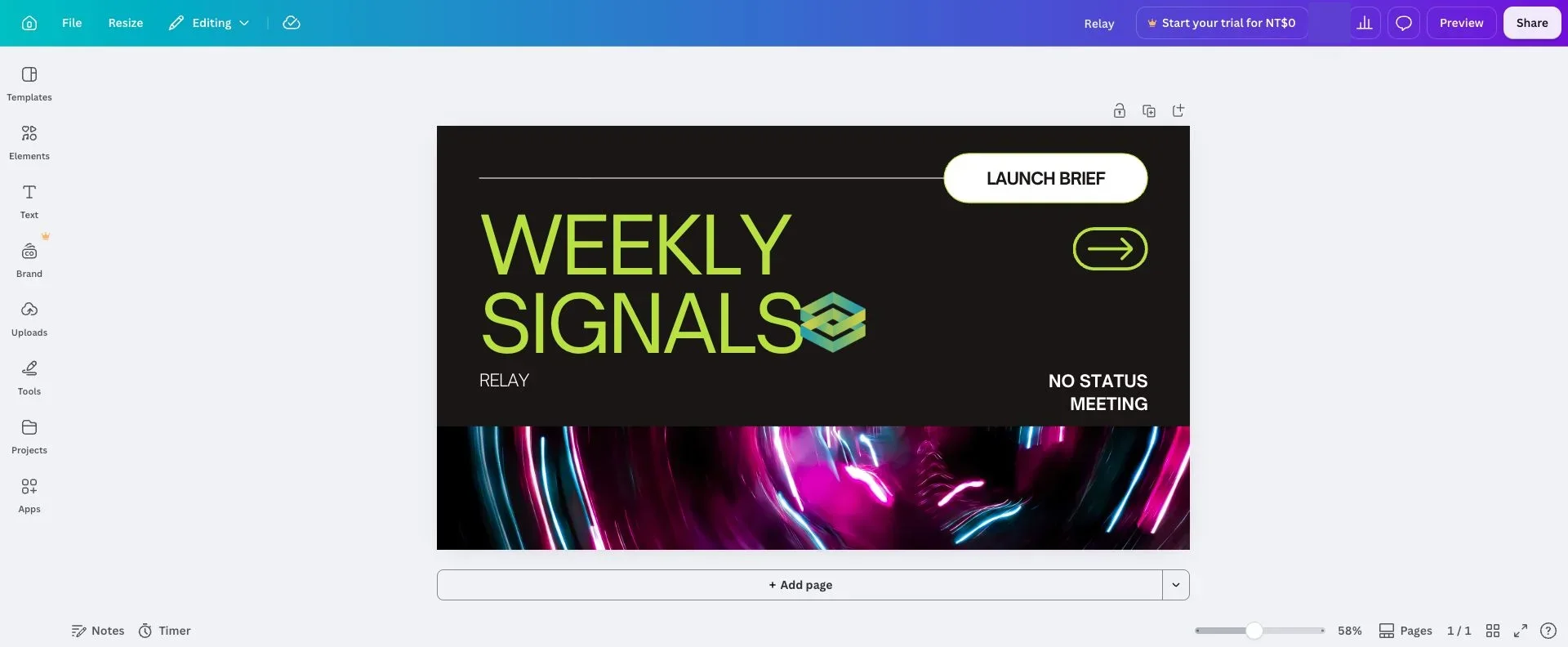
That is Canva’s most valuable form of speed. It does not merely save the time needed to draw a box or place a headline. It supplies relationships—type scale, spacing, rhythm, image treatment, page logic—that a non-designer might otherwise establish inconsistently.
The same advantage creates Canva’s most familiar weakness. A good source template can make a mediocre edit look finished. The fastest route is not always the most distinctive one. The Relay draft only became useful after deciding which parts of the template expressed the product and which parts were decorative residue.
Adobe Express made the opposite trade. A custom 1600 × 900 page kept the canvas central and placed the main creation routes in a compact left rail. The Relay composition was built from individual text decisions: the product name, headline, supporting label, lime accent, and action line all had to be established rather than inherited. What the interface supplied was a legible place to make those decisions; what it did not supply was a visual system.
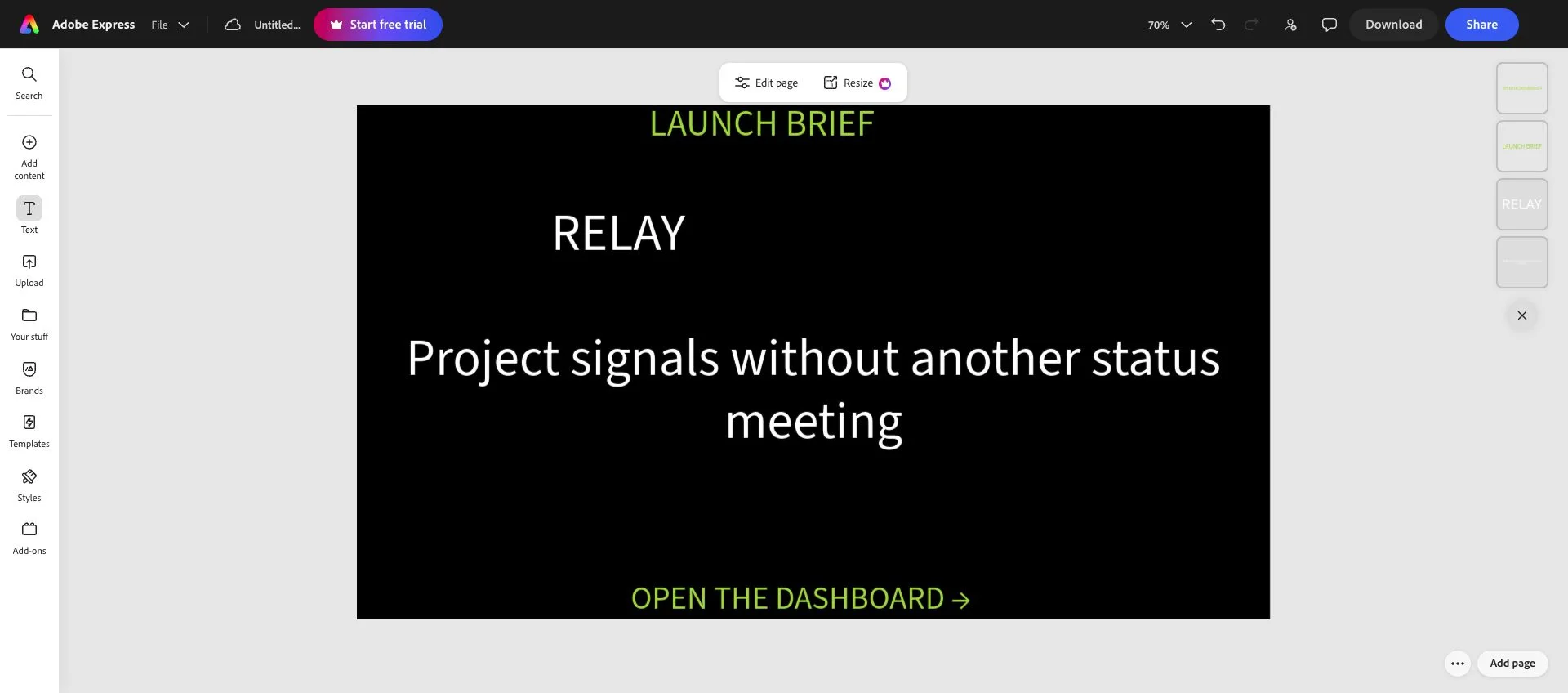
The plainer result shows where the labor moved, not Adobe Express’s quality ceiling. Canva supplied hierarchy; Adobe Express supplied a legible place to build it. Teams with approved typography, colors, layout examples, and assets may prefer that directness. When the request arrives as a sentence and visual direction is still unresolved, Canva carries more of the art-direction work. Advanced vector construction, complex compositing, color-managed print, long-form video, and specialist cross-app handoff were outside this comparison.
Resize is where both free workflows stop being production systems
The approved landscape design was then treated as the master for a square social variant. This is the point at which “easy design tool” turns into “repeatable content operation.” Manually rebuilding one square version is possible. Rebuilding a family of portrait, story, feed, presentation, and banner sizes is where the time compounds.
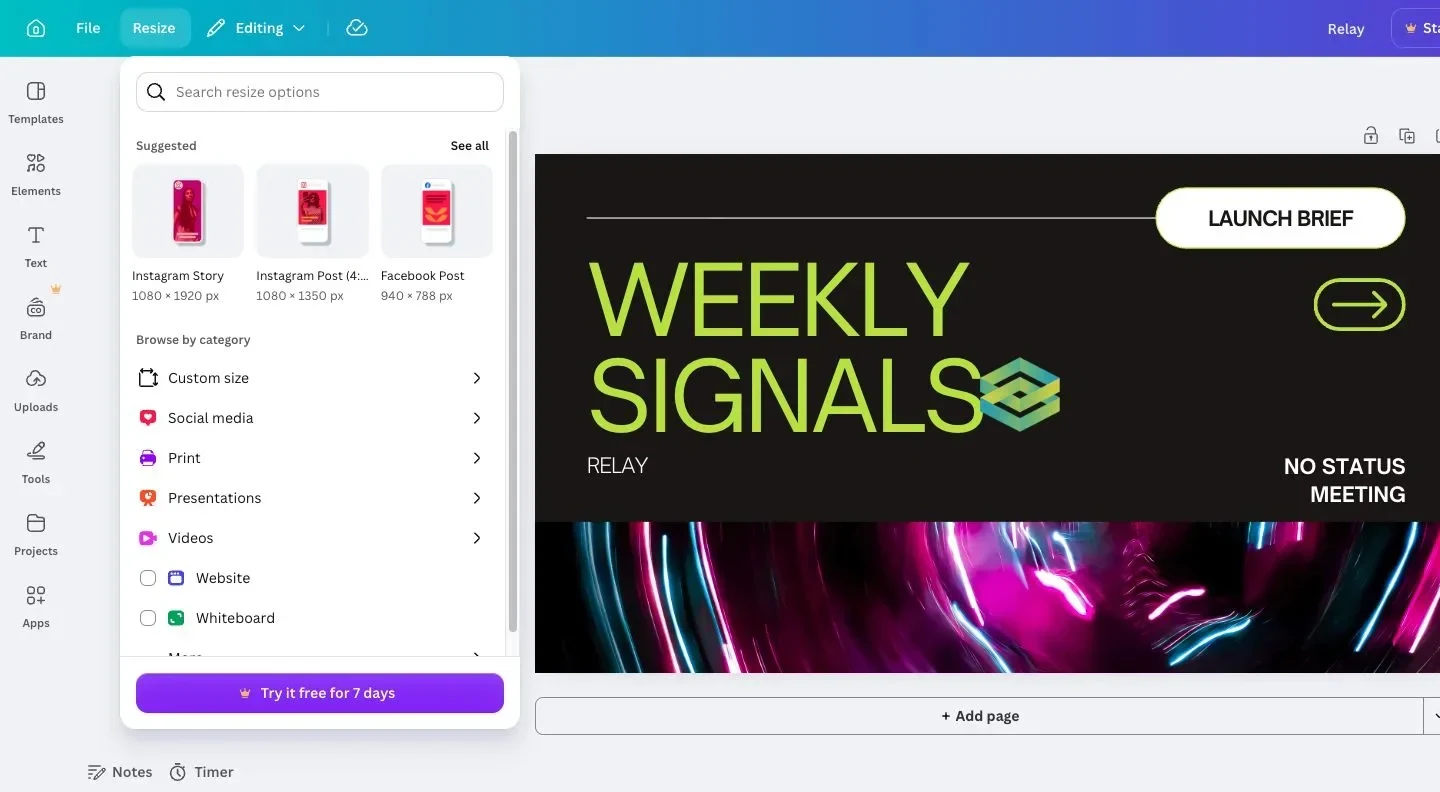
Canva made the available destinations immediately visible—Instagram Story, portrait post, Facebook post, custom sizes, presentations, video, websites, and more—but the panel ended in a trial prompt. The high-value operation is not selecting a new canvas size; it is letting the existing composition adapt to that size.
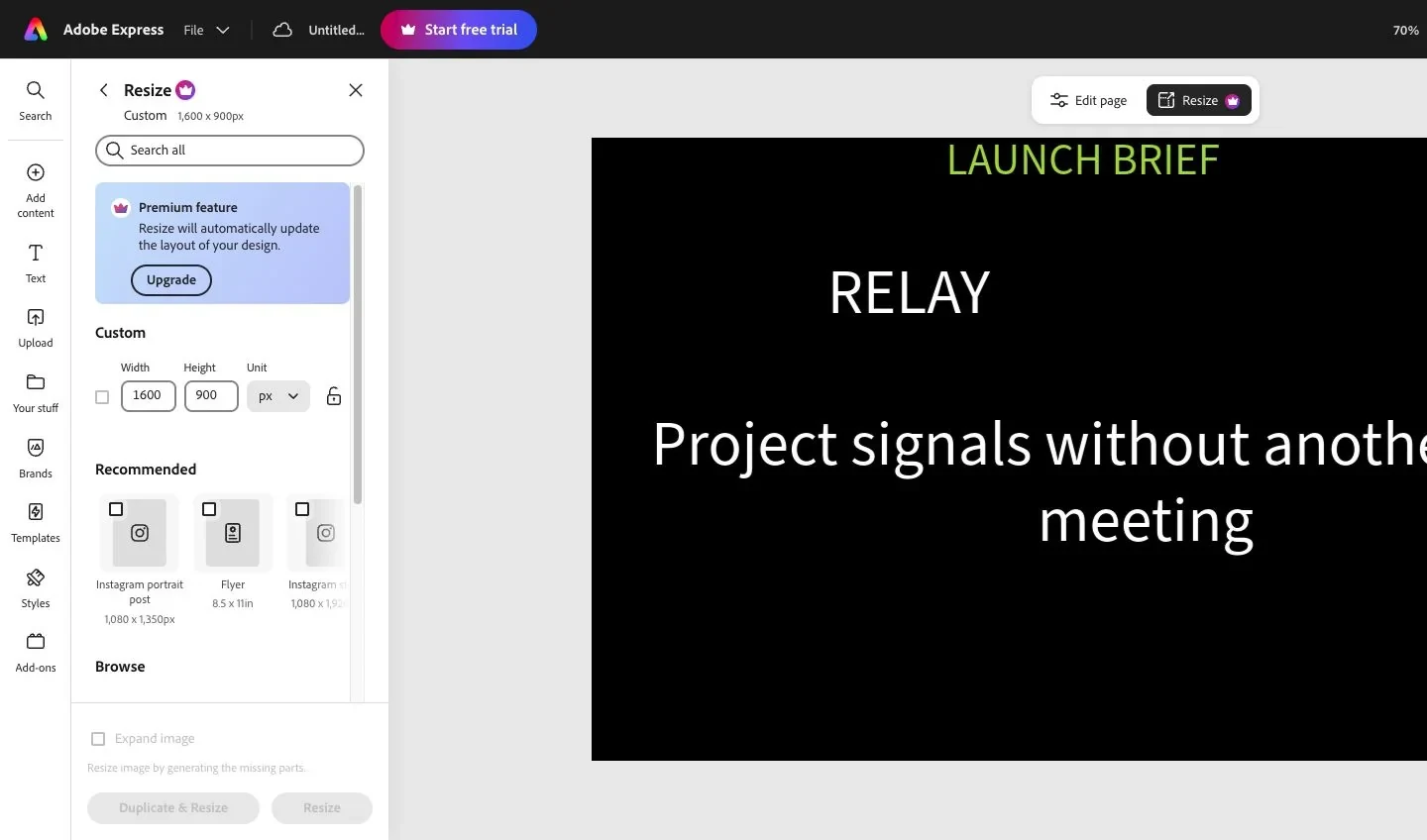
Adobe Express drew an even clearer boundary. The current 1600 × 900 dimensions remained visible, recommended formats sat below them, and the panel explicitly described automatic layout updating as a Premium feature. Duplicate & Resize and Resize stayed disabled.
The official plan pages reinforce what the interfaces showed: Canva lists resize among its paid premium tools, while Adobe lists one-click Resize in Express Premium. Adobe also offers a separate quick action for resizing a flat image; that is not the same as reflowing an editable multi-object design.
For a one-off graphic, this is a modest limitation. For recurring campaign work, it is the purchasing decision. The relevant calculation is not whether either free plan can make a square post. It is how often an approved master has to become five other deliverables.
Handoff revealed a broader difference than the canvas
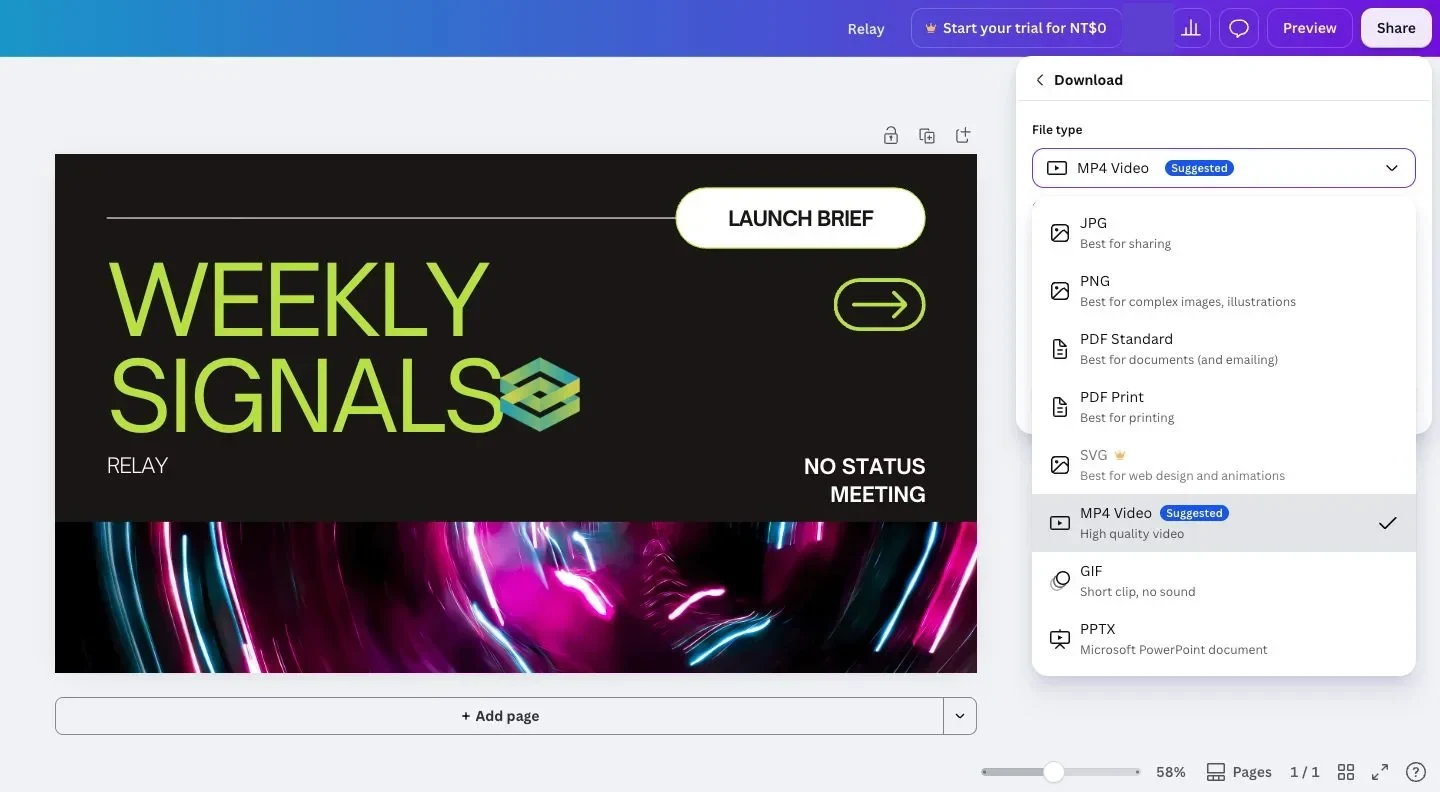
Canva’s download panel exposed JPG, PNG, PDF Standard, PDF Print, GIF, PPTX, and MP4 for this project, with SVG marked as Pro. The selected design included motion, so MP4 appeared as the suggested format; the static and presentation routes remained available in the same list.
Adobe Express offered PNG, JPG, PDF Standard, and PDF Print for the same static design, along with resolution controls that require an upgrade. Those are the right everyday formats for a simple campaign asset and are easier to scan than a long destination list.
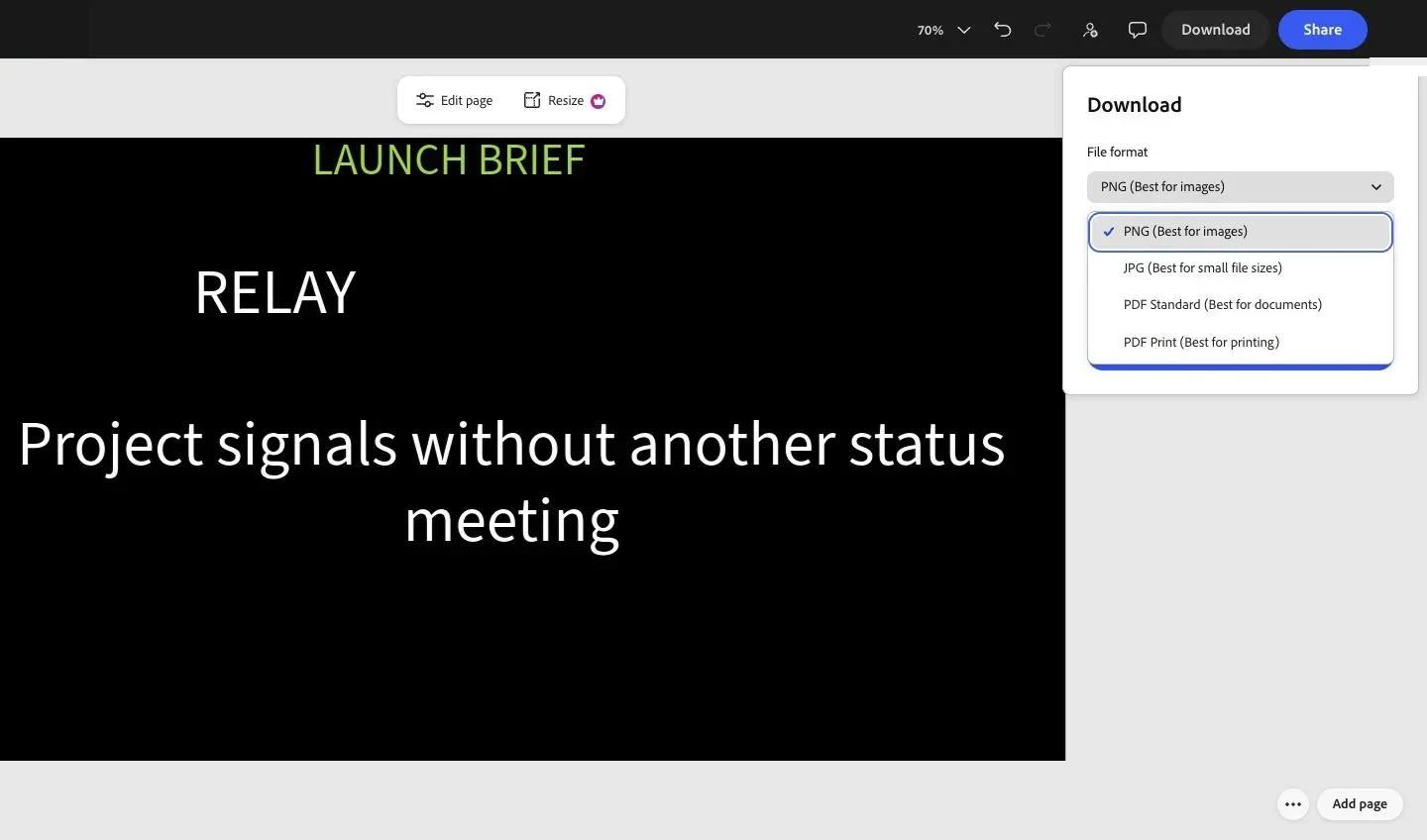
The comparison therefore treats both screenshots as visible export routes, not proof that every generated file was downloaded, opened, and checked. Canva’s menu spans more destination types inside the project; Adobe Express presents a shorter static list. That difference is useful, but it is not a file-quality benchmark.
The decision in one table
| If the scarce thing is… | Better fit | Evidence from this workflow | Important condition |
|---|---|---|---|
| A credible starting system from a vague brief | Canva | The same query returned more presentation-shaped launch systems | Edit far enough to escape a generic template result |
| A direct blank-page route | Adobe Express | The canvas, page actions, and creation rail stayed legible while the five-part asset was assembled | The visual hierarchy needs to be known already |
| Several handoff formats from one project | Canva | Image, PDF, presentation, GIF, and video routes appeared together | Some formats and quality options remain plan-dependent |
| Automatic channel resizing on a free plan | Neither | Both project-level resize panels led to paid features | Manual rebuilding is still possible |
Which one should you choose?
The choice turns on where the work begins. Canva removes more uncertainty before the first layout decision and exposes more destination types at the end. Adobe Express keeps a known static composition straightforward, but asks the editor to bring more of the hierarchy. If the real job begins after approval—five sizes and repeated production—the decisive comparison is the paid resize workflow, not the free canvas.
Discussion
0 replies