
How to lock Claude Code's permission mode before auto mode becomes the default
When several local edits are about to run, permission mode answers a practical question: how often will Claude Code pause before an edit or command? That choice belongs before the session starts, while the intended level of oversight is still clear.
The timing matters because the official release note and Auto mode documentation describe a scheduled change for new sessions on Pro, Max, and Team plans from August 14, 2026. A user-pinned default remains unchanged, and organization-managed defaults are separate. The announcement makes the starting mode worth checking; it does not recommend Auto or prove that every session is affected.
This guide shows the documented settings path, the visible checkpoint that counts as verification, and the recovery boundary exposed by a deliberately harmless, no-account CLI check. The result is a way to set a mode deliberately without treating a JSON file, a clean exit code, or a missing control as proof that the mode is locked.
Start with the mode the task needs
Permission mode controls how often Claude Code pauses before editing files or running commands. More supervision means more interruptions; a looser mode allows longer stretches of work. The right starting point depends on the task, the interface, and the amount of review the work needs. It is not a universal product setting that fits every project.
Before opening the session, identify three things:
- Which interface will run the work: CLI, IDE, Desktop, or another supported surface.
- Whether the task needs a deliberate review point before edits or commands.
- Whether an authorized interactive session is available to show the resulting mode.
The last item is easy to skip. A settings file is an input to a session, not the final receipt. If the session cannot expose an active-mode badge or selector, the mode remains unverified.
Set the documented default or one launch override
The persistent permission-mode default belongs in the user settings file. The permission-mode guide shows this shape:
{
  "permissions": {
    "defaultMode": "plan"
  }
}
plan is an example of the setting shape, not a recommendation for every task. Choose the documented mode that matches the work's review boundary. The current configuration reference lists the supported values and their limits.
For a one-launch choice, use the startup flag instead:
claude --permission-mode plan
The flag changes that launch, so it is useful when a stored default is too broad for one sensitive task or when a temporary mode is needed for a deliberate reason. The user setting is the default; the startup flag is the explicit choice for that invocation.
Do not confuse this permission setting with the Auto classifier's autoMode configuration. They answer different questions. permissions.defaultMode chooses the session's permission mode. autoMode supplies classifier context such as trusted infrastructure. The current Auto configuration documentation gives those blocks different scopes.
There is also a specific placement trap. Current Claude Code documentation says that permissions.defaultMode: "auto" in project and local settings is ignored. A repo-local file therefore is not a durable way to lock Auto. A user setting, a documented startup flag, or an organization-managed setting is the relevant control surface, subject to the policy and interface involved.
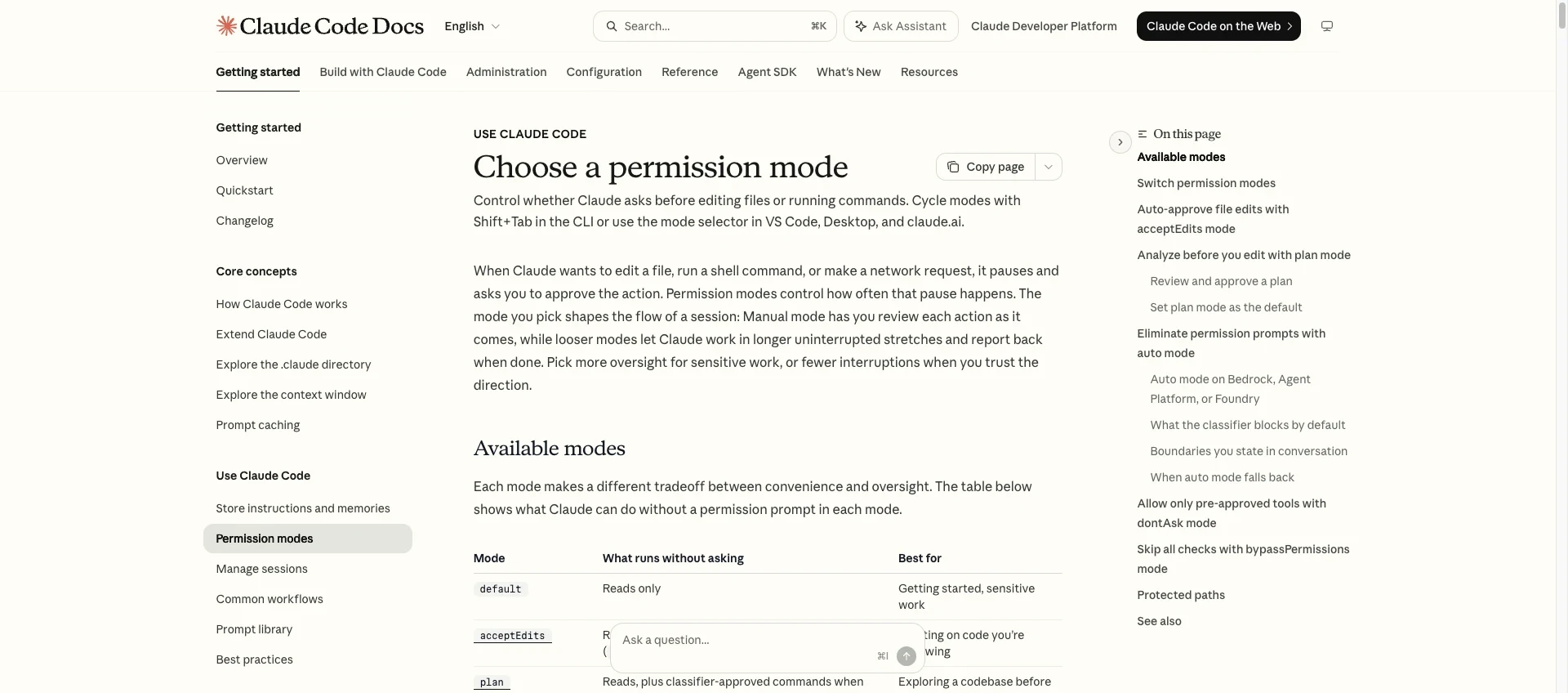
The official English permission-mode documentation shows the mode choices and the visible control path. This is a documentation reference, not a screenshot of a current account or running session.
Verify the running session, not just the JSON
An authorized interactive session has two useful checkpoints, and they answer different questions.
First, read the visible mode badge or selector. In the CLI, Shift+Tab cycles through the modes exposed by that session. The badge tells the reader which mode is active now. Optional modes such as Auto appear only when the session exposes them; a missing option should not be turned into a guess about the account, plan, provider, or organization policy.
Second, use /status to inspect setting sources. The settings documentation describes /status as a way to see where settings are coming from. It is not a complete per-key effective-value report. If a settings error appears, claude doctor is the diagnostic branch for configuration problems. It also is not a replacement for the active mode badge.
The pass condition is therefore specific:
- Pass: the intended mode is visible in the active session, and the setting sources are understood; any relevant settings error has been checked with the documented diagnostic path.
- Unverified: the only evidence is a JSON file, a startup command that never opened a session, a print-mode exit code, or an absent badge/source receipt.
This split prevents a common mistake: treating “the file contains the value” and “the session is running with the value” as the same observation.
Recover when a harmless check cannot show the mode
A deliberately constrained local check made the boundary concrete. It used Claude Code 2.1.92, an isolated fixture, an inline permissions.defaultMode value of plan, an explicit --permission-mode plan, empty tools, and no account or session control plane. No model task ran, and no production file was involved.
The first attempt combined an intended interactive invocation with --no-session-persistence. The CLI rejected that combination and said the flag can be used only with print mode. Because the interactive surface never opened, there was no mode badge. Stop at that point: a usage error is not a permission-mode receipt.
The next attempt used print mode with /status and a zero budget. CLI validation rejected the non-positive budget before a session could expose any mode or setting source. Treat that as an input error, not as evidence that the requested mode is active.
Removing the budget option produced a more misleading result. The process exited with code 0, but -p "/status" was treated as print prompt text and returned Unknown skill: status. No interactive slash-command surface, mode badge, account state, setting-source output, or claude doctor receipt appeared.
The recovery is not to keep varying flags until a command returns a reassuring exit code. Return to the supported user setting or startup flag, then open an authorized interactive session. Read the visible mode badge first. Use /status for source context and claude doctor for settings errors. If that session cannot expose the required checkpoint, leave the mode unverified and do not proceed as if it were locked.
The observation is narrow by design: under these no-account, non-interactive conditions, print output did not substitute for a live visible-mode checkpoint. It does not show that Claude Code is unreliable, that Auto is unavailable, that a particular account is ineligible, or that any mode is safe for every project.
Use a clear proceed or stop boundary
The setup is complete enough to proceed when the intended mode is visible in an authorized interactive session and the setting-source or error path is understood. That is a workflow checkpoint, not a security certification.
Retain more supervision when the task is sensitive, the organization manages the setting, the interface remembers a different mode, or the account and provider state is still unclear. A user-level setting does not prove that managed controls are overridden. A mode visible in one interface does not establish the same state in every other interface.
Stop when the only evidence is a settings file, a video explanation, a zero exit code, a print prompt, or a check that never opened the interactive surface. Recover through the documented settings or startup path rather than assuming that the mode is active.
- Proceed: visible active mode plus understood setting sources and relevant errors.
- Retain supervision: visible mode, but task sensitivity or policy/source precedence still needs human review.
- Stop: no interpretable badge or source/error checkpoint; the state remains unverified.
The safe operating envelope is small and useful: choose the mode before the work starts, verify the mode in the running session, and treat an unknown control state as a reason to pause. No single mode is a universal answer for every project.
Discussion
0 replies